
Can't find the email? Check your spam folder. Or, request a new activation email
Can't find the email? Check your spam folder. Or, request a new activation email
See you next time!
No worries. Type in your email and we'll send you a new password
Or wait until the timer expires to request a code via SMS



2024年7月5日 上午1:30:51
We have some good news to share with you. After thorough research, we found a new site to use Interac e-Transfer when buying Litecoin (LTC): VirgoCX.
VirgoCX
VirgoCX is a Canadian cryptocurrency exchange that allows you to buy Litecoin (LTC) using Interac e-Transfer. Topping up your LeoList Gift Card using Interac e-Transfer is simple - start by signing up to VirgoCX and then follow the instructions below.
How to Find your LeoList Litecoin Address
Finding your LeoList address is as simple as following the steps below.
1. Sign into LeoList, then go to the LeoList Gift Card page.
2. Tap on Cryptocurrency, then Tap on Litecoin.
3. Then Tap the COPY button.
You can also find your Litecoin address by clicking here.
Add Funds with Interac e-Transfer
1. Log in to your VirgoCX account and click on “Fund” from the top navigation.
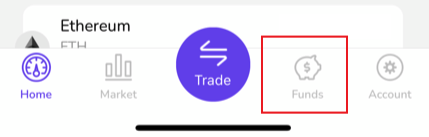
2. Choose “Canadian Dollar” -> “Deposit” -> "Interac E-Transfer".
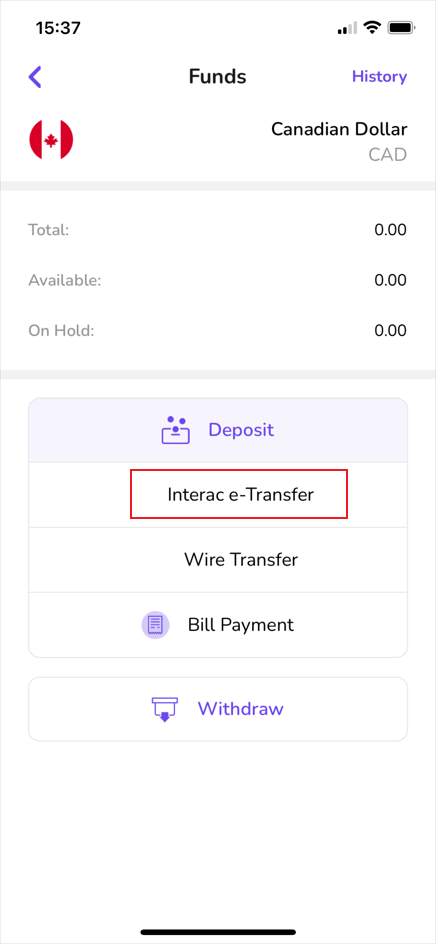
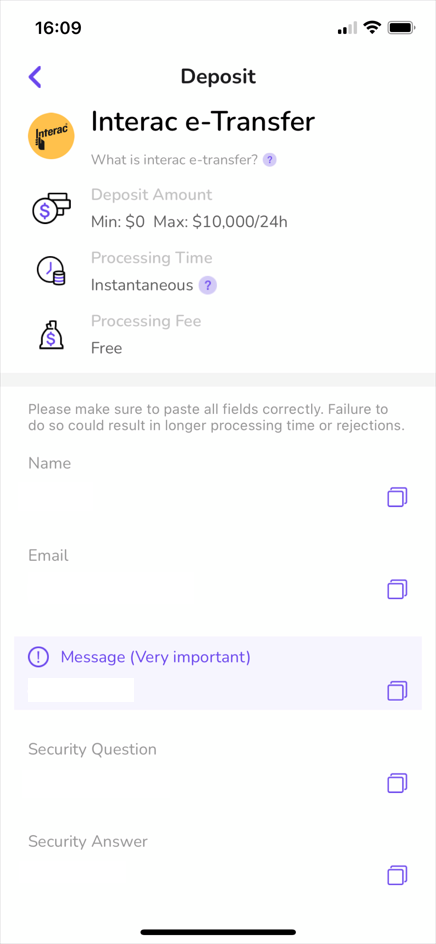
3. From here, you will be given an email address to send funds to, a security question, and a security answer. Navigate to your online banking app to complete the next step. (Note: Please do not use details from the image below. You will have your own information specific to your account).
4. Once you have funds in your VirgoCX account, you can now use these funds to purchase Litecoin.
It’s that simple: your LeoList Gift Card will update within minutes. Happy posting!
Having trouble with VirgoCX? Check out our alternative option for Interac e-Transfer; Netcoins
Cheers,
The LeoList Team 🦁
Please Note: LeoList is in no way related to VirgoCX. All materials and contents found in this blog are strictly for general circulation and informational purposes only and should not be considered as an offer, or solicitation, to deal in any of the services or products found/identified in this site.